What hello, world was for
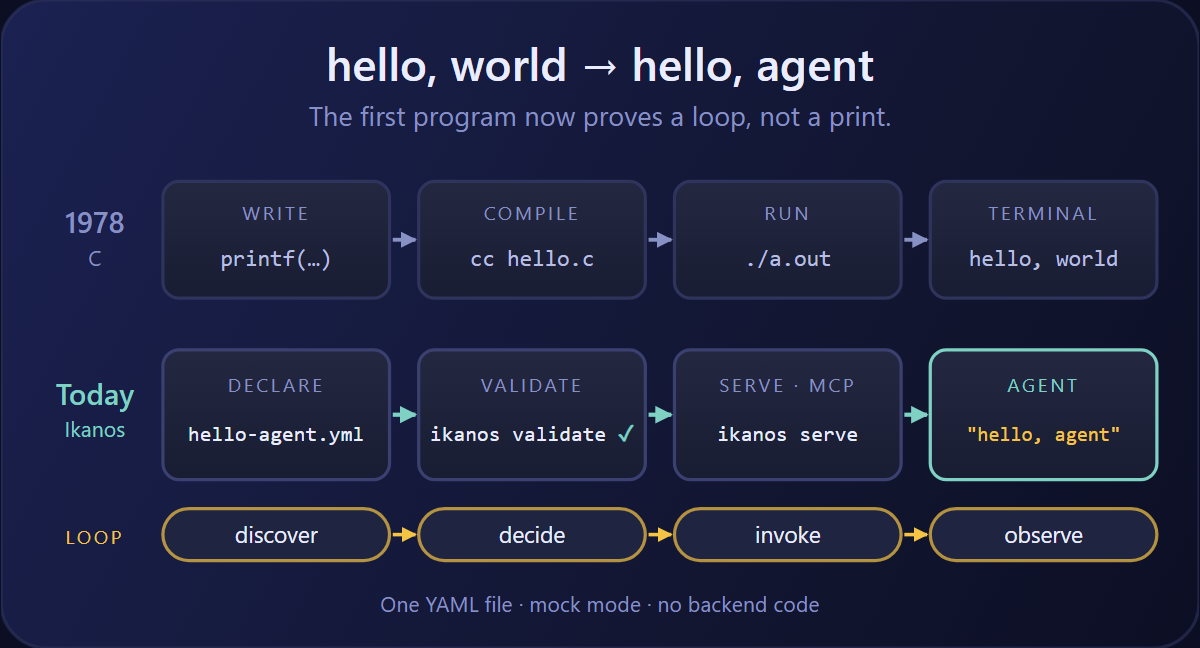
In 1978, Brian Kernighan and Dennis Ritchie opened The C Programming Language with four lines that every programmer has typed since:
main()
{
    printf("hello, world\n");
}
The program is trivial on purpose. Its job is not to say anything interesting. Its job is to prove that the whole chain works: the editor, the compiler, the linker, the runtime and the terminal. If those two words appear on screen, you can start building.
The reader of that program is a human looking at a terminal. The output is a line of plain text. The failure mode is a compiler error or a crash, and the compiler tells you which one before anything runs.
The reader is now a model
Software built for agents has a different reader. The consumer is a model, not a terminal, and it does not run your code from top to bottom. It reads a contract, decides whether a tool fits its goal, calls it, and folds the result into its context window.
So the first program has to prove a different chain: discover, decide, invoke, observe. If any link is broken, the symptom is not a segfault. It is a tool the agent never finds, a call it shapes wrongly, or an answer it invents because the tool returned nothing it could use.
| hello, world (C) | hello, agent (Ikanos) | |
|---|---|---|
| Reader | A human at a terminal | An AI agent |
| What you write | Imperative code: printf |
A declarative contract: a capability that exposes an MCP tool |
| Checked before it runs by | The compiler | ikanos validate, against the Ikanos schema |
| What happens at runtime | Compile, run, exit | Discover, decide, invoke, observe |
| Output | Unstructured text on stdout | Structured JSON in the model’s context |
| How it fails | Compiler error or crash | Rejected contract, malformed call, or a hallucinated answer |
The rest of this post builds that second column, end to end, in about five minutes.
The capability: one tool, no backend
Here is the whole program. Save it as hello-agent.yml:
ikanos: "1.0.0-beta8"

capability:
  exposes:
    - type: mcp
      port: 3001
      namespace: hello
      tools:
        greet:
          description: "Greets an agent and confirms the server is ready."
          outputParameters:
            message:
              type: string
              value: "hello, agent"
            status:
              type: string
              value: "ready"
It declares one MCP server on port 3001 with one tool, greet. There is no consumes block and no call, so Ikanos runs the tool in mock mode: each output parameter carries a static value, and the engine returns them as a JSON object. Nothing to implement, nothing to deploy, no glue code.
Two lines matter more than they look:
- The
descriptionis the interface. It is the only thing the model reads when it decides whether to callgreet. In C, a bad comment costs nothing. Here, a vague description is a tool the agent never picks. - The
namespaceis the identity. It names the server, and it is what lets another capability import this one later.
Validate before you serve
A C program does not run until it compiles. A capability should not reach a model until it validates. The Ikanos CLI checks the file against the Ikanos JSON Schema:
ikanos validate hello-agent.yml
✓ Validation successful!
  File: hello-agent.yml
  Status: OK
Now break it the most common way: copy an example written for an older release. Change the first line to ikanos: "1.0.0-beta6" and validate again:
✗ Validation failed!
  File: hello-agent.yml

Errors found:

  [1] must be the constant value '1.0.0-beta8'
      Path: $.ikanos
The command exits non-zero and points at the exact line. The mistake is caught at your desk, before an agent ever tries to call a tool that is not there.
Serve it and say hello
ikanos serve hello-agent.yml
The capability is now an MCP server on http://localhost:3001/. Ikanos speaks the stateless MCP 2026-07-28 protocol, so there is no session handshake: every request stands on its own.
An agent connecting to it walks the four steps of the loop:
- Discover. It sends
tools/listand gets back one tool,greet, with its description and an empty input schema. - Decide. The model reads the description and judges that
greetis the right first call to confirm its environment. - Invoke. It sends
tools/callforgreet. - Observe. Ikanos returns the mocked payload as structured content:
{"message": "hello, agent", "status": "ready"}
You can play the agent yourself with curl:
curl -s http://localhost:3001/ \
  -H "Content-Type: application/json" \
  -H "Accept: application/json, text/event-stream" \
  -H "MCP-Protocol-Version: 2026-07-28" \
  -H "Mcp-Method: tools/call" \
  -H "Mcp-Name: greet" \
  -d '{"jsonrpc":"2.0","id":1,"method":"tools/call","params":{"name":"greet","arguments":{},"_meta":{"io.modelcontextprotocol/protocolVersion":"2026-07-28"}}}'
The text you get back is not for you. It is context, shaped as JSON, for the next step of a model’s reasoning. That is the real difference between the two hello programs.
From hello to real work
Mock mode is where you start, not where you stay. The same file grows in three directions without changing shape:
- Wire it. Add a
consumesblock for a real API and replace the static values with acall. The tool contract the agent sees does not change, so nothing downstream breaks. - Shape it. Use
outputParametersto return only the fields the agent needs, instead of a full upstream payload that eats its context window. - Expose it again. Add a
restorskillentry next tomcp, and the same capability serves a different kind of consumer.
As the file grows, so do the ways to get it wrong. Beyond the schema, Ikanos ships a ruleset for naming, security and MCP conventions, which Polychro runs in your editor, your coding agent or CI.
The Ikanos tutorial follows exactly that path, starting from a mock like this one.
The takeaway
- hello, world proved the toolchain. hello, agent proves the loop: discover, decide, invoke, observe.
- In Ikanos, the whole program is one short YAML file. Mock mode gives you a working MCP tool with no backend code.
- The tool
descriptionis the interface the model reads. Write it as carefully as you would a function signature. - Run
ikanos validatebeforeikanos serve, the way a C program compiles before it runs.