Today we’re shipping the Naftiko beta 2 wave, and this time the headline isn’t the engine — it’s the editor. Our VS Code extension gets the biggest upgrade of the release: first-class OpenAPI support alongside Ikanos, fully configurable file detection, and a leaner runtime with the last external editor dependency removed.
The rest of the fleet — Ikanos and Polychro — also cut a beta 2 with stability, packaging, and housekeeping passes that keep the fleet in lockstep — version and schema alignment, documentation positioning, CI hardening, and dependency automation. The substantive story of beta 1 still stands, so if you missed those releases, start there: both are stable enough for real integrations.
This post is about what happens when you take the same linting engine and move it left one more step — off the CI gate, past the agent’s inner loop, and all the way into the human’s editor.
The Problem: The Spec Author Is Still Flying Blind
Polychro beta made the case that the linter belongs inside the agent’s generate-validate-retry loop, not at the CI gate. That’s true. But there’s still a human in the picture — the engineer who opens a capability file, tweaks a consumes adapter, adjusts an output mapping, and hits save.
For that person, the feedback loop was still too long:
- The mistake is invisible until you run something. A misspelled field, an invalid
mapping, a broken schema shape — none of it shows up until you feed the file to the engine or push it to CI. The editor stays silent while the file quietly rots. - Two formats, two tools. A real integration author lives in both Ikanos capability specs and the OpenAPI documents they import from. Linting one in the IDE and the other somewhere else means switching tools mid-task.
- Editor prerequisites. Earlier Crafter builds leaned on a third-party YAML extension to light up. That’s one more thing to install, one more version to reconcile, one more support-matrix cell — for a tool whose whole point is to be frictionless.
None of these are intrinsic to spec authoring. They’re intrinsic to leaving the linter out of the one place the author spends all day: the editor.
The Crafter Answer: The Same Engine, Now Underlining as You Type
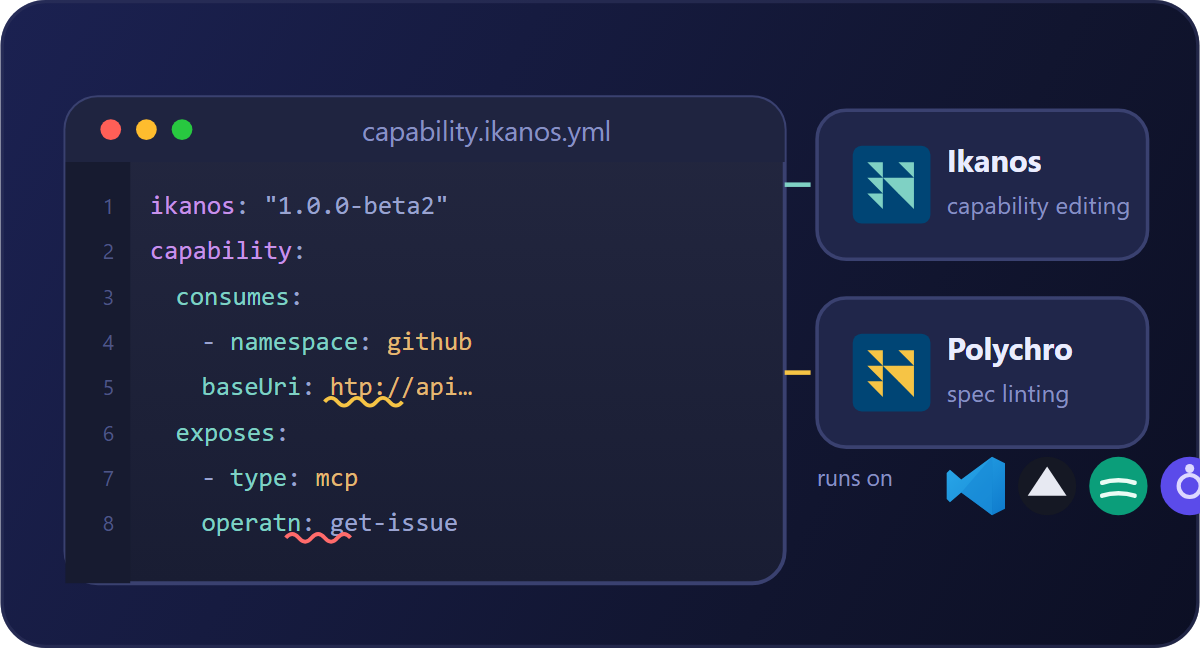
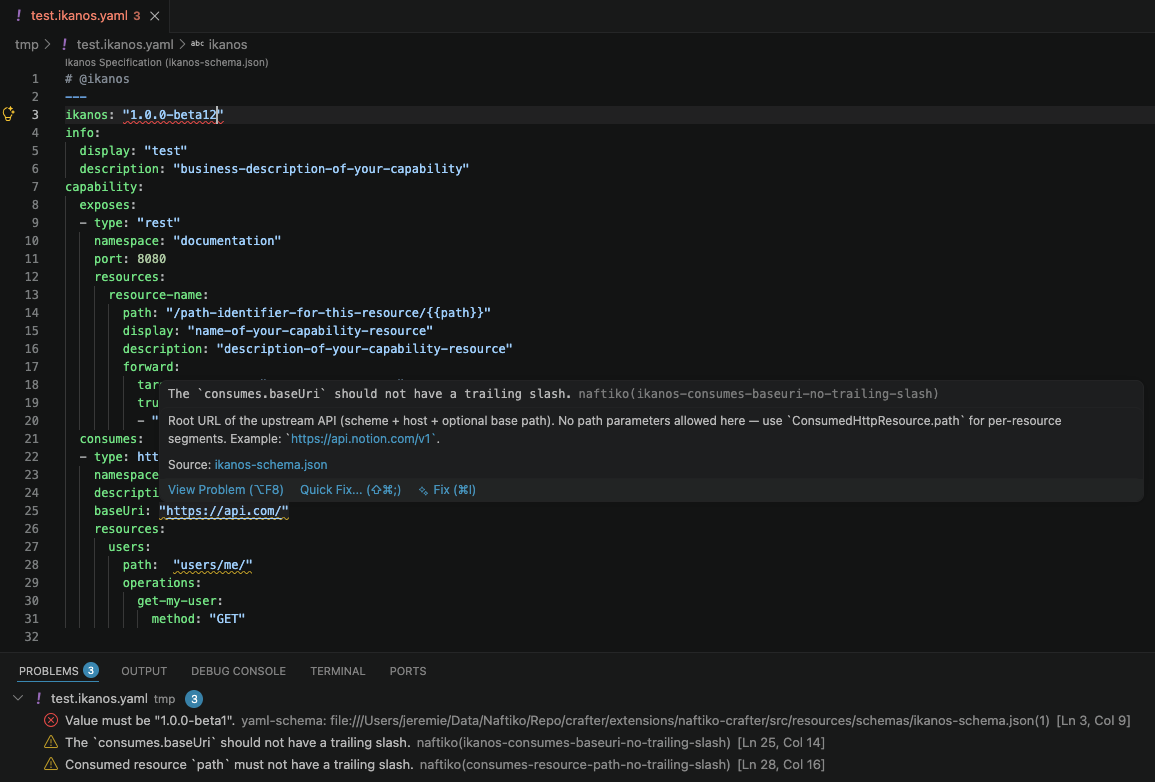
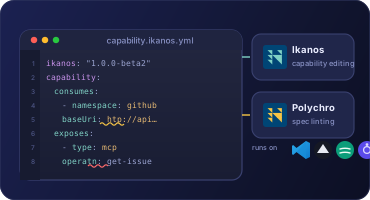
Crafter is the capability editor and linter of the Naftiko Fleet — a VS Code extension that lints your files (schema validation and rule validation) directly in your IDE. It surfaces problems two ways: inline, underlining the offending node so you can hover for details, and in the Problems panel, listing every diagnostic across every open supported file.
The important part is what’s under the hood. Since beta 1, Crafter embeds the Polychro native binary — the very same self-contained engine your agent runs — bundled inside the extension. No Node.js runtime, no @stoplight/* packages, no user-side prerequisites. The ruleset your CI uses, the ruleset your agent uses, and the ruleset your editor uses are the same rules, running the same way. Rule validation is capped at half a second, so it keeps up with your keystrokes.
The key insight is that the linter should follow the spec everywhere it lives — the CI gate, the agent’s loop, and now the author’s editor — with one engine and one ruleset behind all three. Beta 2 closes the editor gap.
What’s New in Beta 2
🌐 OpenAPI Support — Alongside Ikanos
The flagship feature of beta 2: Crafter now lints OpenAPI definitions as a first-class format, right next to Ikanos capability specs. That covers OpenAPI 3.1, OpenAPI 3.0, and Swagger 2.0, each validated against its embedded schema.
This matters because the two formats are two halves of the same job. You import an OpenAPI document to generate an Ikanos consumes block, then hand-tune the capability — and now both sides of that workflow are linted in the same editor, with the same diagnostics format, without switching tools. A new Default format setting (ikanos by default, or oas) tells the linter which schema to reach for.
🎛️ Configurable File Detection
Live linting used to key off hard-coded conventions. Beta 2 parameterizes them, so you decide which files Crafter watches:
- Supported extensions — files ending in
.ikanos.yml/.ikanos.yamlby default, now fully editable. - Supported modelines — the
@ikanosmarker in the first five lines of a YAML file by default, now a configurable list.
Point Crafter at your own naming scheme and it lights up on the files you actually author — no more, no less.
🧹 One Fewer Dependency — RedHat YAML Extension Removed
Crafter no longer depends on the RedHat YAML extension to function. Everything it needs is bundled. That’s one less prerequisite to install, one less version to reconcile across your team, and one less thing to break on a fresh machine — in keeping with the same “self-contained, zero external runtime” philosophy that drove the Polychro binary bundling in beta 1.
🧭 Still Frictionless by Design
Everything that made Crafter easy stays put: manual linting via the Naftiko: Validate File command, automatic live linting on detected files, custom rulesets via Naftiko: Browse for Custom Ruleset File… (your rules run alongside the built-ins), and Naftiko: Show Naftiko Crafter Infos to see the extension version and the embedded Polychro version at a glance.
And it runs where you already work. Crafter targets VS Code engine 1.95.0 for maximum compatibility, and is verified on VS Code, Cursor, Windsurf, Antigravity, and Kiro — so the AI-first IDEs your team has adopted get the same inline governance as stock VS Code.
The Rest of the Fleet
Both engines Crafter sits on top of cut a beta 2 alongside this release, but neither carries new headline capabilities — beta 2 for them is stability, packaging, and alignment work (schema/version splitting, README positioning, CI hardening, dependency automation, and a Polychro markdown/HTML ruleset-enrichment refinement). The substance is still in the beta 1 releases we shipped earlier this month, so if you’re new to Naftiko, start there:
- Ikanos — the open-source engine for Spec-Driven Integration. Declare a capability entirely in YAML and the engine serves it as an MCP, Skill, REST, and Control server, with no Java and no code generation. Beta 1 shipped Binary Content end-to-end and fully fixed the native CLI. It’s the MCP server your agent needs, not the one your vendor ships. For a worked example, see how one capability fuses Notion and GitHub into a single spec-sync tool.
- Polychro — the open-source AI linter for spec-driven development, and the engine bundled inside Crafter. It lints YAML, JSON, XML, Markdown, and HTML in a single fast pass, as a self-contained native binary or in-process on the JVM. Beta 1 made JavaScript ruleset functions work reliably in the native binary and shipped the first complete tutorial.
Crafter is where those two engines meet the developer: Ikanos defines the schema, Polychro enforces the rules, and Crafter puts both in your editor.
Editions
Crafter is included in every edition of the Naftiko Fleet — Community (local-first via CLI + VS Code extension), Developer, Team, and Enterprise. The beta 2 extension is the Community entry point: install it, open a capability or OpenAPI file, and start getting inline diagnostics immediately.
Installing the Beta 2 Extension
Crafter beta 2 is now live on the VS Code Marketplace. Install it in one click from the Marketplace listing, or open the Extensions view in VS Code (or Cursor, Windsurf, Antigravity, or Kiro), search for Naftiko Crafter, and hit Install.
Prefer to install from a packaged .vsix? Download the extension file, then run Extensions: Install from VSIX… from the command palette (Ctrl+Shift+P / Cmd+Shift+P) and point it at the file.
On the Roadmap
Beta 2 delivers the linting foundation. The visual half of Crafter — the bidirectional YAML canvas, drag-and-drop consumes/exposes, step orchestration, and OpenAPI export from an exposed REST adapter — is next on the delivery sequence. The principle stays the same: the YAML is always the source of truth, and every visual edit round-trips without losing comments, ordering, or formatting.
By the Numbers
Crafter beta 2 adds OpenAPI (3.1 / 3.0 / Swagger 2.0) as a first-class linted format, parameterizes file-extension and modeline detection, and removes the last external editor dependency — all on top of the bundled Polychro native binary introduced in beta 1.
The linter has moved into your editor. Crafter is the capable hands of the Naftiko Fleet — schema-aware, Polychro-integrated, and now fluent in two spec formats.